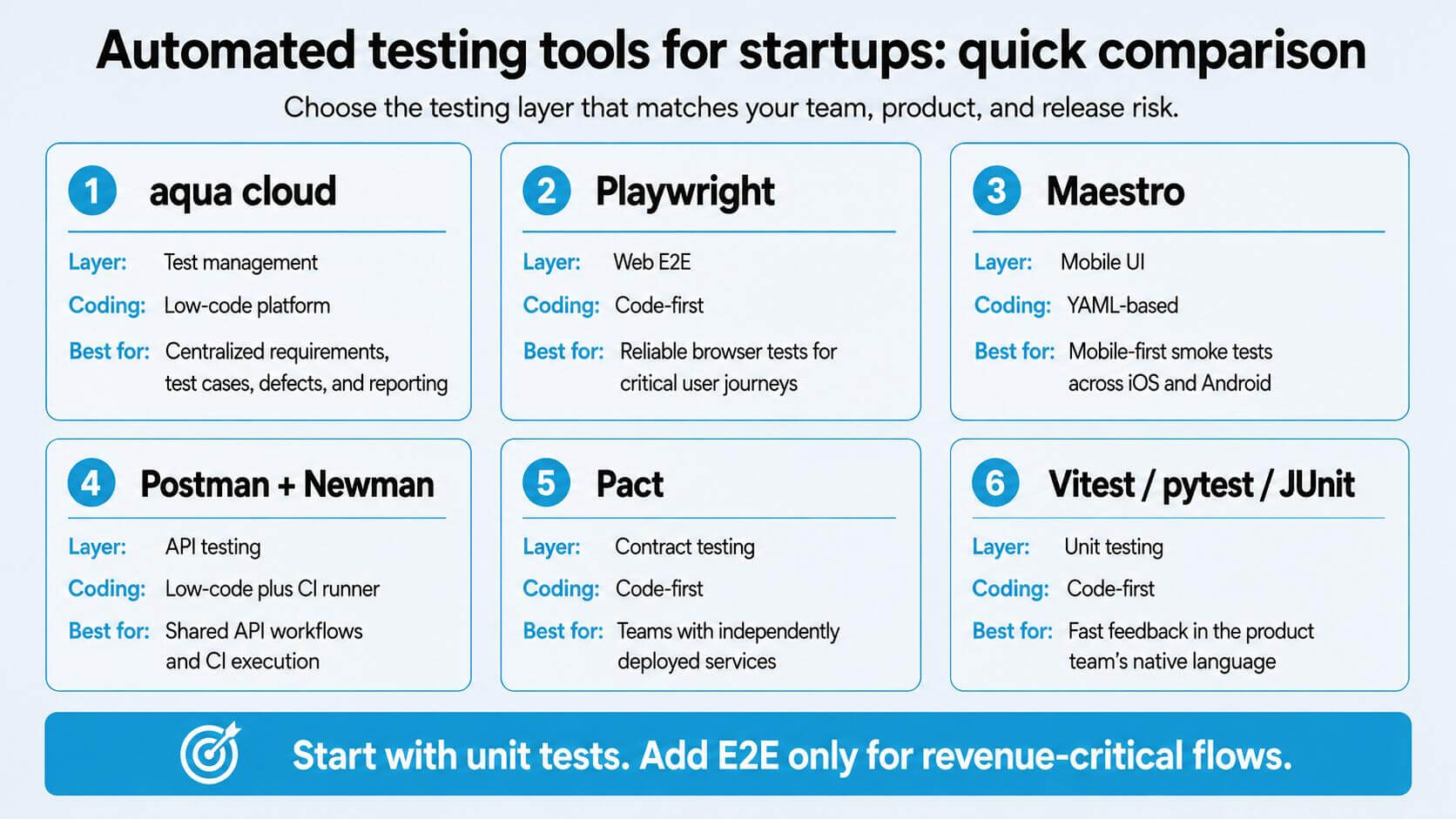
Automated Testing Tools for Startup Teams: Top 15 Picks
When dealing with more complicated software solutions, the sheer number of test cases can be extreme. So, automated testing is a must. However, your teams may experience struggles with test failures anyway because of an outdated stack or improper QA system handling, resulting to delayed releases and financial losses. To assist you with choosing the best solutions, this guide covers 15 automated testing tools for startup teams, organized by category. You'll also find a selection framework and implementation advice to get testing running fast, without QA overhead.
Startups should introduce automated testing early. Manual QA struggles to support frequent releases, while adding test coverage to a mature codebase requires significantly more effort.
Prioritize revenue-critical workflows. Automate sign-up, checkout, and payment processes first, while keeping end-to-end test suites focused on essential business scenarios.
Select tools that align with the existing technology stack. Familiar languages and frameworks improve maintainability and make it easier to integrate tests into every pull request.
Use contract testing to validate service integrations. When frontend and backend teams deploy independently, contract tests verify API expectations without relying on slow, complex end-to-end scenarios.
Apply the same quality standards to AI-generated and manually written tests. Generated tests still require review, isolation, stable test data, and clearly assigned ownership.
Find out which small, code-native tools actually fit your team size, tech stack, and the risks that undermine growth 👇
Why Startups Should Not Skip Test Automation
Startup software testing runs differently at high deployment velocity. Teams that deploy frequently quickly see why automated vs manual testing matters. Manual coverage can handle sign-up and payment flows once or twice a day. Once deployment frequency rises, bugs slip through and support tickets pile up. Reliable automated suites in continuous delivery pipelines deliver feedback in under ten minutes, which keeps failure rates low and deployment frequency high.
The business case gets clearer around Series A. As the team grows and features multiply, manual regression turns into a multi-day process that blocks releases. Adding tests to a growing codebase later is always harder than starting early.
Start with the revenue path and automate sign-up and payment flows first. Test automation for small business follows the same principle: start narrow, then expand as risks become clear.
When Should a Startup Start Test Automation?
Starting early makes sense. Starting on an unstable MVP with a large E2E suite does not. The right moment depends on what your product is doing, not just how old it is.
Pre-product-market fit
At this stage, UX changes constantly and automating flows that will be redesigned next sprint creates unnecessary overhead. Focus on unit tests for stable business logic and basic API checks. Add a few smoke tests for critical paths. Keep exploratory and manual testing for anything related to changing user experience.
Early traction
This is when automation starts paying off. Core flows like sign-up, authentication, and checkout are stabilizing. Automate those first, run tests on pull requests, and assign clear ownership within your team. If nobody owns a test, nobody fixes it when it breaks.
Scaling startup
At this point the coverage defects starts costing money. Expand regression coverage, add contract tests as services multiply, and bring in cross-browser and performance testing for endpoints that affect retention. Centralize results so your whole team can see what’s passing, what’s failing, and what’s blocking the next release.
Readiness checklist
Before automating any scenario, check these conditions:
The core flow has stayed stable across several releases
The same regression scenario is repeated regularly by your team
A failure in this flow has measurable revenue or customer impact
Someone in your team is assigned as the owner of this test
The test can run in CI without manual setup
If a flow doesn’t meet most of these, manual or exploratory testing is the better investment for now.
What Makes a Testing Tool Right for a Startup
Enterprise platforms assume a dedicated QA team and months of setup before anything runs. Startups need something different. These are the factors that actually matter when evaluating the best startup testing software for your team:
Fast setup
Your team should run the first test within an hour. Tools that require dedicated servers or lengthy proof-of-concept processes add cost before they add value.
Clear failure diagnosis
When a test fails, your team should know why in minutes. Auto-waiting, test isolation, screenshots, and trace logs cut diagnosis time significantly. Good failure visibility is often worth more than raw execution speed.
CI/CD integration without friction
GitHub Actions, GitLab CI, CircleCI, Jenkins. Whatever pipeline your team uses, the tool should connect via a few lines of YAML. Custom Docker configurations and complex authentication setups eat time you don’t have.
Transparent pricing
Open-source runners and per-seat pricing that scales with headcount are good signals. “Contact sales” gates for basic features are not.
Language and framework fit
If your product is TypeScript and React, a Java-first tool creates unnecessary friction. The fastest path to abandoned tests is forcing your team into an unfamiliar ecosystem.
The strongest testing stack is one with a platform that ties everything together. That’s where aqua cloud, an AI-powered test and requirement management solution, comes in handy for your startup team. aqua centralizes your test management, requirements, and defect tracking in one developer-friendly platform. With aqua’s domain-trained AI Intelligence powered by RAG grounding, you can generate project-specific test cases from requirements in seconds, and because it learns from your own documentation, every suggestion speaks your product’s language instead of generic boilerplate. Your team gets bidirectional Jira sync, REST API access for custom workflows, and real-time dashboards that give visibility. aqua connects natively with Ranorex, SoapUI, JMeter, Jenkins, Azure DevOps, Confluence, PowerShell, UnixShell, Database MSSQL, and Database Oracle. The Capture integration records every test run as video and screenshots. Over 10 native automation integrations, plus a REST API for everything else your pipeline runs.
Save 12+ hours per week per user and keep your entire testing operation in one place with aqua
Automated Testing Tools for Startups: Quick Comparison
The 15 tools below cover different testing layers and are not direct replacements for each other. This table helps your team build a shortlist before reading the full descriptions.
Tool
Testing layer
Coding required
Supported platforms
CI/CD
Free option
Best for
aqua cloud
Test management
No
Web, API, mobile
Yes
Yes (guests free)
Centralizing tests, requirements, defects
Maestro
E2E, UI
No (YAML)
Android, iOS, web
Yes
Yes
Mobile-first smoke tests
Postman + Newman
API
Low
API
Yes
Yes
API workflows for mixed teams
Cypress
E2E
Yes
Web
Yes
Yes (core runner)
Interactive browser testing
BugBug
E2E, UI
No
Web
Yes
Yes
No-code web automation for small teams
Katalon Studio
E2E, API, mobile
Low/Yes
Web, API, mobile, desktop
Yes
Limited
Single tool for multiple test types
Vitest
Unit, component
Yes
Web (Vite stack)
Yes
Yes
TypeScript/JavaScript unit testing
Playwright
E2E
Yes
Web, mobile viewports
Yes
Yes
Cross-browser coverage, revenue paths
pytest
Unit, integration
Yes
Python backends
Yes
Yes
Python service testing
JUnit
Unit
Yes
Java, Kotlin, Android
Yes
Yes
JVM-based application testing
Pact
Contract
Yes
API services
Yes
Yes
Independent service deployments
Robot Framework
Acceptance, E2E
Low
Web, API, desktop
Yes
Yes
Keyword-driven tests, mixed teams
Testim
E2E, functional
Low
Web
Yes
Limited
Reducing E2E maintenance overhead
Applitools Eyes
Visual
Low
Web, mobile, desktop
Yes
Limited
Visual regression across browsers
mabl
E2E
Low
Web
Yes
No
QA teams scaling from manual testing
15 Best Automated Testing Tools for Startup Teams in 2026
Finding the best testing software for startup applications starts with the test pyramid. Fast unit and integration tests belong at the base. A short set of E2E tests for revenue-critical journeys sits at the top. The tools below cover the full range of automated testing tools for startup tech stacks, grouped by category so your team can pick what fits.
Test Management Platform
1. aqua cloud, test and requirement management platform
Type: Test management and requirements platform
Best for: Startups that have outgrown spreadsheets and need a central hub for test cases, requirements, and defect tracking
aqua cloud sits in a different category from the other tools on this list. As a test management and requirements platform, it centralizes manual tests, automated test results, and requirements in one place. The platform then connects directly to the CI tools and automated frameworks your team already runs.
Without a central platform, test results end up scattered across Jira tickets and spreadsheets with no single source of truth. aqua gives your team that source of truth without requiring a dedicated QA engineer to maintain it.
Key capabilities:
Intelligence AI trained on your project documentation for context-aware test case generation
Bidirectional Jira sync for defect tracking
Real-time dashboards for developers, QA, and product teams
REST API for triggering test runs from any CI pipeline
Reusable test steps, bulk editing, and nested test cases
Unlimited free guest seats for support, product, and founder visibility
aqua integrates natively with Ranorex, SoapUI, JMeter, Jenkins, Azure DevOps, Confluence, PowerShell, UnixShell, Database MSSQL, Database Oracle, and Capture. Capture records test execution as video and screenshots. For everything beyond the native integrations, the REST API connects aqua to Playwright, Cypress, pytest, and most other runners in your pipeline.
Boost test management efficiency by 80% with aqua Intelligence AI
No-code platforms let non-engineers write tests without writing code. They work well for smoke tests and happy paths. Tests still need maintenance and clear ownership within your team to remain useful.
2. Maestro
Type: Mobile and web UI automation
Best for: Mobile-first startups needing cross-platform smoke tests
Maestro describes UI journeys as readable YAML flows and supports Android, iOS simulators, React Native, Flutter, and web. JUnit reports go to CI automatically. The test format is readable enough for the whole team to review and maintain. If your product lives on phones and you want to avoid Appium’s operational complexity, start here. Connect results to aqua via REST API for centralized traceability.
3. Postman Collections + Newman
Type: API testing
Best for: Teams where non-engineers need visibility into API scenarios
Postman collections are API workflows that product and partner teams can share and read. Newman runs them in CI, and the format is portable across tools. Code-native API tests are usually cheaper for engineering-only teams, but Postman makes API testing accessible across your entire org. Newman results connect to aqua via REST API.
4. Cypress: Open-Source Runner with Optional Cypress Cloud
Type: E2E testing
Best for: Teams that want an interactive visual runner and scriptable depth in one tool
Cypress covers both no-code-friendly debugging and full scripted automation within the same framework. The interactive test runner lets non-technical users follow tests in real time. The core open-source runner handles scripted E2E testing for developers who prefer to work in the repository directly. Cypress Cloud is an optional paid layer that adds flake detection and failure grouping. A practical choice whether your team is coming from manual testing or already writing code. Test results sync to aqua via REST API for centralized management.
5. BugBug
Type: No-code web E2E automation
Best for: Small teams that need reliable web smoke tests without writing code
BugBug lets your team record and run browser tests without scripting. The test editor is visual and the scheduling and CI integration work out of the box. Maintenance is low compared to code-based alternatives, making it a good fit when no dedicated QA engineer is available. Results connect to aqua via REST API.
6. Katalon Studio
Type: No-code and scripted testing
Best for: Teams wanting a single tool for web, API, mobile, and desktop
Katalon provides both no-code and scripted options with built-in keywords and CI/CD integration. The free version has feature limits; paid plans include advanced analytics and team collaboration. Connects to aqua via REST API.
Most of my teams don't do the test cases - we try to push for automation as much as possible, so the E2E tests are our "test cases". Those that do collect them on the wiki pages/confluence, but I try to push them away from wasting time on that.
Code-first frameworks live in your repository and use the same language as your product, fitting naturally into existing build pipelines. For developer-led startups, this is the practical default for automated testing tools in startup workflows.
7. Vitest
Type: Unit and component testing
Best for: TypeScript or JavaScript products built with Vite
Vitest reuses Vite configuration and offers Jest-compatible APIs. Watch mode reruns related tests with zero extra setup. The framework works natively with React and Vue projects, with Svelte support built in. Results sync to aqua via REST API.
8. Playwright
Type: Cross-browser E2E testing
Best for: Web startups needing reliable E2E coverage for revenue-critical paths
Playwright delivers cross-browser testing with auto-waiting, test isolation, code generation, and CI trace debugging. Coverage spans Chrome, Firefox, Safari, and mobile viewports. The trace viewer makes failure diagnosis faster than most alternatives. Playwright integrates with aqua via REST API, giving your team full traceability from test execution to defect.
9. Cypress (code-native)
Type: E2E testing
Best for: Teams with existing Cypress expertise
The open-source Cypress runner offers time-travel debugging and a mature plugin ecosystem. Cypress Cloud adds paid analytics, but the core runner is free and powerful. A solid alternative to Playwright when your team already knows the tooling. Integrates with aqua via REST API.
10. pytest
Type: Unit and integration testing
Best for: Python backend teams
pytest fixtures create controlled test contexts, and parametrization supports broad input coverage. If your backend is Python, this is the standard foundation for unit and integration tests. Enable parallel execution only after test isolation is confirmed, or shared state failures become hard to track down. pytest feeds results to aqua via REST API.
11. JUnit
Type: Unit testing
Best for: Java and Kotlin teams
JUnit is annotation-based with built-in assertions and lifecycle hooks. For Spring Boot services or Android apps, it’s the native choice. Pair it with MockK or Mockito for test doubles. Run in parallel once isolation is confirmed. JUnit results connect to aqua via REST API for consolidated reporting.
12. Pact
Type: Contract testing
Best for: Teams with independently deployed services
Pact captures the API interactions a consumer relies on, then verifies the provider against those assumptions. This approach replaces slow cross-service E2E scenarios when frontend and backend teams ship on separate schedules. Consumer tests must exercise the real API client code, and providers must verify contracts in CI. Pact integrates with aqua via REST API.
AI-Assisted Testing Platforms
Automated AI software testing tools generate tests and help reduce the time your team spends on maintenance. Generated tests must pass the same review and isolation standards as handwritten ones, with clear ownership assigned. LLM-generated tests tend to be at least as flaky as developer-written tests. Treat these tools as writing assistants, not QA replacements.
AI automated penetration testing tools for startups are also part of this landscape. These platforms automate common vulnerability scenarios and flag suspicious API behavior early in the development cycle. Manual security audits still matter, but these tools provide continuous baseline protection for teams where security is a compliance requirement.
13. Testim
Type: AI-powered functional test automation
Best for: Teams reducing E2E maintenance overhead
Testim uses machine learning to stabilize locators and self-heal tests when UI elements change. Pricing is per-user; verify current rates before committing. Connects to aqua via REST API.
14. Applitools Eyes
Type: Visual AI testing
Best for: Design-system-heavy products with frequent UI changes
Applitools compares rendered screenshots against baseline images across browsers and device viewports, catching visual regressions that assertion-based tests miss. The platform integrates with Selenium, Playwright, Cypress, and Appium. Control snapshot volume carefully to keep review noise manageable. The free tier covers limited screenshots; paid plans scale with usage. Results connect to aqua via REST API.
15. mabl
Type: Low-code AI test automation
Best for: QA teams scaling from manual to automated testing
mabl offers AI-powered self-healing, auto-maintenance, scheduling, and integrated test management. Pricing can escalate as test volume grows, so validate cost fit before committing. Connects to aqua via REST API.
Also worth considering:
Axe-core for automated accessibility checks. Integrates natively with Playwright and Cypress, both of which connect to aqua. Treat it as a defect detector, not a complete accessibility audit: keyboard navigation and screen-reader behavior still need manual validation.
Functionize for natural-language test authoring and self-healing at scale. Enterprise-focused pricing; validate cost fit for early-stage teams.
AI-generated image.
Whatever you pick, the real fix is just having one source of truth. The main thing to check is how clean the Jira and GitHub integration actually is in practice vs on paper.
How to Choose the Right Tool for Your Team Size and Stack
The right automated testing tools for your startup’s tech stack depend on team size and deployment frequency. Risks that could actually hurt your business should shape the final decision. These are the practical decisions:
1. Match tools to your language
TypeScript teams should use Vitest or Jest. Python backends belong with pytest, and Java shops start with JUnit. Use what your team already knows, because unit tests are cheap and fast, catching most logic bugs before they reach production.
2. Limit E2E tests to revenue-critical paths
Sign-up and payment flows: that’s it to start. E2E tests are slow and expensive to maintain. Use Playwright for new stacks, or Cypress if your team already has the expertise. Keep the suite under 15 tests until you’ve proven you can maintain it without flakiness creeping in.
3. Choose mobile tools based on platform depth
For simple cross-platform smoke tests, Maestro works on Android, iOS, React Native, and Flutter without server setup. Move to Appium when your team needs deep platform-specific controls or an existing device-cloud strategy.
4. Add contract tests when services deploy independently
When frontend and backend teams ship on separate schedules, add Pact. Contract testing catches integration failures before production and removes the need for slow cross-service E2E tests.
5. Add performance testing when latency becomes a product risk
Slow endpoints or infrastructure cost spikes are the signals. Start with smoke and average-load scenarios. Run them against controlled environments with realistic data, and set clear cost limits before you begin.
6. Pilot AI tools before committing budget
Generate tests, run them ten times in CI, measure flakiness, and check diagnosis time. If the savings aren’t clear after two weeks, don’t commit. AI tools work best alongside engineering judgment, not as a substitute for it.
You’ve got the framework shortlist. Now you need a platform that actually orchestrates it all without becoming yet another burden. aqua cloud, an AI-driven test and requirement management platform, solves that by centralizing manual tests, automated test results, requirements, and defects in a single platform that integrates with the tools your developers already use. Trigger test runs via REST API from your CI pipeline, sync defects bidirectionally with Jira, and generate comprehensive test cases in seconds using aqua’s AI Intelligence — uniquely powered by RAG grounding in your project’s own documentation, delivering context-aware results that generic AI tools simply can’t match. Reusable test steps, bulk editing, nested test cases, and real-time dashboards mean your small team can operate with enterprise-grade rigor without hiring a dedicated QA engineer. Whether you’re running Playwright in GitHub Actions or Cypress in GitLab CI, aqua fits into your workflow instead of forcing you to change it.
Centralize your startup's testing and deploy with confidence
The best automated testing tools for startup teams are the ones your developers actually run on every pull request.
Start with unit tests in your native language. Add Playwright or Cypress for critical browser journeys, plus axe-core for accessibility checks. Mobile-first teams add Maestro; API-first teams focus on Pact for contract coverage.
Add test management or visual testing tools only after measuring a recurring problem they solve. Faster feedback at the lowest useful layer, combined with a small set of E2E proofs, delivers the most confidence per engineering hour. No test should go without a clear owner.
What is the best automated testing tool for a startup with no dedicated QA engineer?
Start with Vitest or Jest for unit tests and Playwright for critical E2E journeys. For CI, GitHub Actions is the simplest starting point. If non-engineers in your team need to create or review tests, aqua cloud fills that gap. Its AI Intelligence generates test cases from requirements, and dashboards give product and support teams visibility without needing to touch code. Pick tools that live in your repository and run automatically on every pull request.
How is automated testing different from manual testing, and when should a startup make the switch?
Manual testing is a human clicking through your app to verify it works. Automated testing is code that does the same checks, but faster and on every code push. Make the switch when you’re deploying more than twice a day, or when manual regression testing takes more than an hour. Any revenue path that can’t afford to break should be the first thing automated. Start with the workflows that generate revenue, then expand as risks become clear.
How do automated tests connect to a startup's CI/CD pipeline?
Most automated testing tools for startup workflows integrate with CI platforms like GitHub Actions or GitLab CI through simple YAML config files. You define a job that runs your test suite on every pull request or merge to main. The CI runner installs dependencies, runs the tests, and reports pass/fail status. Failed tests block the pull request before merging. aqua cloud sits on top of this: it receives results via REST API, links them to requirements, and gives your whole team a single place to see what passed, what failed, and what’s blocking the next deploy.
How many automated tests does a startup actually need?
Fewer than most teams expect. A practical baseline is 50 to 200 unit tests covering core business logic and 5 to 15 E2E tests on revenue-critical paths. Contract tests can be added as services multiply. Coverage reliability matters far more than raw test count. aqua’s real-time dashboards make it easy to track coverage across test types without manually compiling reports or chasing down results in different tools.
Can a startup skip automated testing until after product-market fit?
Technically possible, but the cost compounds quickly. Teams that delay testing spend significantly more time on manual regression per release by Series A. Starting with a few critical-path tests takes hours to set up and pays back almost immediately. aqua cloud is designed to scale with this: start with lightweight test management and expand coverage as your product and team grow, without switching platforms.
Enhancement of the aqua product is Martin’s main responsibility and biggest mission. His expertise covers ITIL Process Consulting, Change Management, Quality Assurance, Quality Management, and Requirements Management. Martin works in QA services for regulated industries for more than 18 years being an irreplaceable leader at…
Pavel, a Quality Assurance Consultant and Author, brings deep expertise to solving complex testing challenges. His background in software development has helped organizations transform their QA practices from reactive to proactive. Beyond consulting, Pavel develops best practice guides and case studies for aqua cloud that…
Home » Test Automation » Automated Testing Tools for Startup Teams: Top 15 Picks
Do you love testing as we do?
Join our community of enthusiastic experts! Get new posts from the aqua blog directly in your inbox. QA trends, community discussion overviews, insightful tips — you’ll love it!
We're committed to your privacy. Aqua uses the information you provide to us to contact you about our relevant content, products, and services. You may unsubscribe from these communications at any time. For more information, check out our Privacy policy.
X
🤖 Exciting new updates to aqua Intelligence are now available! 🎉